
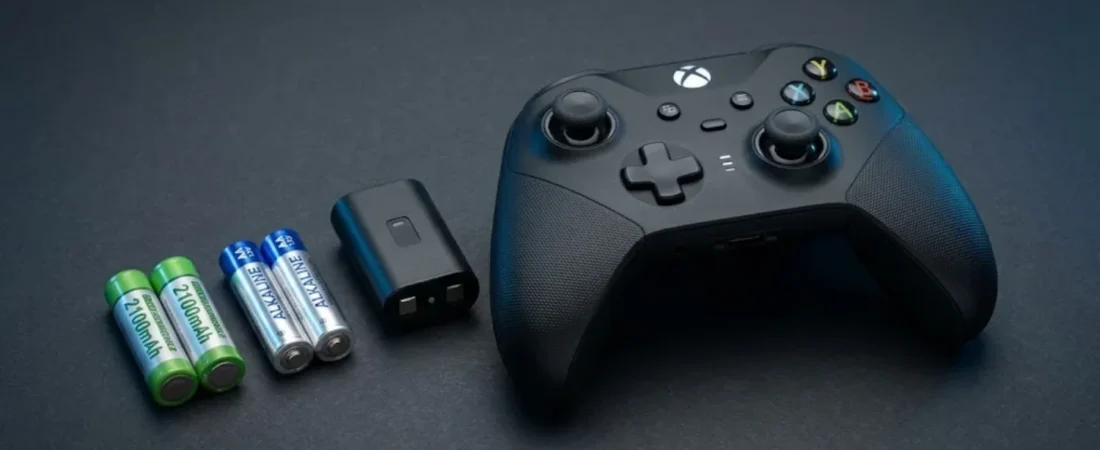
If you are wondering what batteries Xbox controllers take, the answer depends on the controller model. Most standard Xbox Wireless Controllers use two AA batteries, while some models and accessories offer rechargeable battery options. The Xbox Elite Wireless Controller Series 2 is different because it has a built-in rechargeable battery.
This guide explains which battery types work, how rechargeable options compare, and what to check before buying batteries for your controller.
What Batteries Do Xbox Controllers Use?
Most standard Xbox Wireless Controllers use two AA batteries installed in the compartment on the back of the controller. You can use compatible disposable alkaline AA batteries or rechargeable AA batteries.
The main options include:
- AA alkaline batteries: Disposable batteries with a nominal voltage of 1.5V.
- AA NiMH rechargeable batteries: Reusable batteries with a nominal voltage of approximately 1.2V.
- Xbox rechargeable battery pack: A dedicated rechargeable pack designed for compatible Xbox Wireless Controllers.
Microsoft rates its current Xbox Wireless Controller for up to 40 hours of battery life with standard AA batteries. This is a manufacturer estimate, not a guaranteed runtime. Actual battery life varies with usage, connected accessories, and other conditions.
Which Battery Type Is Best for an Xbox Controller?
The best option depends on whether you prefer convenience, lower long-term waste, or a rechargeable setup.
AA Alkaline Batteries
Alkaline AA batteries are a simple option because they are widely available and ready to use. When the batteries run out, you replace them with a fresh pair.
They are useful if you do not want to manage charging. However, regularly buying disposable batteries can become expensive over time.
Rechargeable AA NiMH Batteries
Rechargeable AA nickel-metal hydride (NiMH) batteries are a practical choice for frequent gaming. You can recharge them with a compatible AA battery charger and keep a second pair ready.
Most standard Xbox Wireless Controllers designed for AA batteries can use compatible rechargeable AA NiMH cells. Check your controller documentation and battery specifications before purchasing.
Official Xbox Rechargeable Battery Pack
Microsoft also offers the Xbox Rechargeable Battery + USB-C Cable. It fits compatible Xbox Wireless Controllers with a USB-C port and can be charged while installed.
Microsoft lists up to 30 hours of battery life per charge and a full charge in under four hours. Actual results vary with usage and accessories.
Do Xbox Controllers Use AA or AAA Batteries?
Most standard Xbox Wireless Controllers use two AA batteries, not AAA batteries.
AA and AAA batteries are different physical sizes. An AAA battery is smaller and is not a direct replacement for an AA cell in the controller’s battery compartment.
Always check the battery size printed in your controller’s documentation or compartment before buying replacements.
Battery Types by Xbox Controller Model
Not every Xbox controller uses the same battery arrangement.
| Controller | Battery arrangement |
|---|---|
| Xbox Wireless Controller for Xbox Series X|S | Two AA batteries or a compatible rechargeable pack |
| Standard Xbox One Wireless Controller | Two AA batteries; rechargeable options depend on model and connection |
| Xbox Elite Wireless Controller Series 2 | Built-in rechargeable battery |
| Xbox 360 Wireless Controller | Two AA batteries or a compatible Xbox 360 battery pack |
The Xbox Elite Wireless Controller Series 2 has an integrated rechargeable battery, so you do not install two AA batteries in it. Xbox 360 accessories are also different from modern Xbox Wireless Controller accessories. Do not assume that a battery pack designed for one generation will fit another.
How to Install Batteries in an Xbox Controller
Installing AA batteries is straightforward:
- Turn the controller over.
- Remove the battery cover.
- Insert two AA batteries, matching the positive (+) and negative (−) markings.
- Replace the battery cover.
- Turn on the controller and check that it powers on.
If the controller does not turn on, check the battery direction and make sure both cells are seated correctly.
Rechargeable AA Batteries vs. Xbox Battery Packs
Both options reduce the need to buy disposable batteries, but they work differently.
Rechargeable AA batteries are charged outside the controller using a compatible NiMH charger. You can keep spare cells ready and swap them in when the current pair runs low.
A dedicated Xbox battery pack fits inside the controller and uses its supported charging connection. The official Xbox Rechargeable Battery + USB-C Cable is designed for compatible USB-C Xbox Wireless Controllers.
If you want flexible replacements and the ability to use the same batteries in other devices, rechargeable AA cells may be more convenient. If you prefer charging the controller without removing individual cells, a compatible battery pack may be easier.
For a closer look at runtime, read our guide to Xbox controller battery life. If you are choosing a rechargeable setup, see our guide to the best rechargeable batteries for Xbox controllers.
Can You Charge AA Batteries Inside an Xbox Controller?
Do not assume that the controller’s USB port will recharge ordinary AA batteries.
Standard disposable AA batteries must never be charged. Rechargeable AA NiMH batteries should be removed and charged using a compatible AA charger unless the battery manufacturer explicitly states that the specific product supports in-controller charging.
A compatible dedicated Xbox rechargeable battery pack is different: it is designed to charge through its supported controller connection.
Common Xbox Controller Battery Problems
The Controller Does Not Turn On
Check that both batteries are installed in the correct direction. Try another known-good pair if the controller still does not power on.
The Battery Level Drops Quickly
Old, low-quality, or partially discharged batteries may provide less runtime. Connected accessories and usage patterns can also affect battery life.
Rechargeable Batteries Do Not Seem to Work
Make sure the batteries are compatible AA NiMH cells, fully charged, and installed correctly. If necessary, test them in another compatible device.
The Controller Does Not Charge
Check whether you are using a compatible rechargeable pack and the correct cable or charging accessory. A USB cable alone does not make ordinary AA batteries rechargeable.
Frequently Asked Questions
What batteries do Xbox Series X controllers take?
The standard Xbox Wireless Controller for Xbox Series X|S uses two AA batteries. You can also use compatible rechargeable AA batteries or a supported rechargeable battery pack.
Can I use rechargeable AA batteries in an Xbox controller?
Yes. Compatible AA NiMH rechargeable batteries are a common alternative to disposable alkaline AA cells. Charge them with a suitable NiMH charger.
Does an Xbox controller come with rechargeable batteries?
The included battery arrangement can vary by controller bundle and retailer. Check the product listing before buying if a rechargeable pack is important to you.
Does the Xbox Elite Series 2 use AA batteries?
No. The Xbox Elite Wireless Controller Series 2 has an integrated rechargeable battery.
Can I use AAA batteries in an Xbox controller?
No. Standard Xbox Wireless Controllers that require AA batteries are designed for AA-size cells. AAA batteries are physically smaller and are not a direct replacement.
Final Verdict
Most standard Xbox Wireless Controllers use two AA batteries. You can choose disposable alkaline batteries, rechargeable AA NiMH cells, or a compatible dedicated Xbox rechargeable battery pack.
Before buying, confirm your controller model and charging port. That simple check helps you avoid purchasing a battery or accessory that does not fit your controller.