

A battery can still show 100% charge and be noticeably weaker than it was when the device was new. That is where a battery health check becomes useful.
The percentage you see in the status bar tells you how much charge is available right now. It does not tell you how much energy the battery can hold compared with its original capacity.
As rechargeable lithium-ion batteries age, their capacity gradually falls. You may notice shorter runtime, more frequent charging, or changes in how the device behaves under heavier workloads. Battery health information can help you work out whether normal aging is likely to be part of the problem.
This guide focuses on understanding battery health results, rather than showing the step-by-step settings for every device. If you need those instructions, see the battery health guide for device-specific methods.
What Is a Battery Health Check?
A battery health check gives you an indication of the battery’s current condition and remaining capacity.
Depending on the phone or laptop, you may see a percentage, a health status, a cycle count, or capacity figures. The terminology varies, but the underlying idea is similar: how much usable battery capacity remains compared with when it was new?
Three terms are especially useful to understand.
Battery Level
Battery level is the amount of charge available at a particular moment.
If your phone says 35%, it means the battery currently has about 35% of its available charge remaining.
Battery Health
Battery health is about the battery’s longer-term condition.
For example, a battery with an estimated 85% maximum capacity can still charge to 100%, but that 100% represents less total capacity than it did when the battery was new.
Apple describes maximum capacity in similar terms, measuring current battery capacity relative to when the battery was new.
Battery Cycle Count
A cycle is based on using an amount of battery energy equivalent to 100% of its capacity, not simply plugging the charger in once.
For example, using 50% one day and another 50% later can add up to approximately one full cycle.
Cycle count can provide useful context, but it should not be viewed on its own. Battery age, temperature, charging habits, and usage all influence how a battery ages.
What Does a Battery Health Check Actually Tell You?
A battery health result is more useful when you understand what is behind the number.
Depending on the device, you may see:
- Maximum capacity
- Full-charge capacity
- Design capacity
- Battery cycle count
- Battery condition
- Health status
- Service or replacement recommendations
Not every device reports all of these.
A phone may give you a simple health status, while a laptop may provide more technical capacity information. That is why comparing battery results between different brands can sometimes be misleading.
The important question is not whether one device displays more information than another. It is whether the available information helps explain the device’s current behavior.
What Does Battery Health Percentage Mean?
A battery health percentage is generally an estimate of how much capacity the battery can hold compared with when it was new.
For example, imagine a battery originally capable of storing 5,000 mAh of energy. If its estimated maximum capacity has fallen to around 4,250 mAh, that would represent roughly 85% of its original capacity.
That does not mean the device will always provide exactly 85% of its original runtime. Real-world battery life depends on much more than capacity.
Screen brightness, apps, mobile reception, wireless connections, temperature, workload, and software activity can all affect runtime.
A useful way to think about the percentage is:
It is a capacity indicator, not a promise of exact battery life.
A Simple Battery Health Reference
| Battery Health | What It Generally Suggests |
|---|---|
| 95–100% | Little noticeable capacity loss |
| 90–94% | Some normal aging |
| 80–89% | Noticeable capacity loss may be present |
| Below 80% | Significant degradation may be worth evaluating |
| Falling unusually quickly | Look for battery, charging, heat, or usage issues |
These are general reference points, not universal replacement rules.
For example, Google identifies battery health below 80% as “Reduced” on supported Pixel models. Apple uses model-specific capacity and cycle expectations, including an 80% design target at specified cycle counts under ideal conditions.
So a percentage should always be interpreted in the context of the particular device.
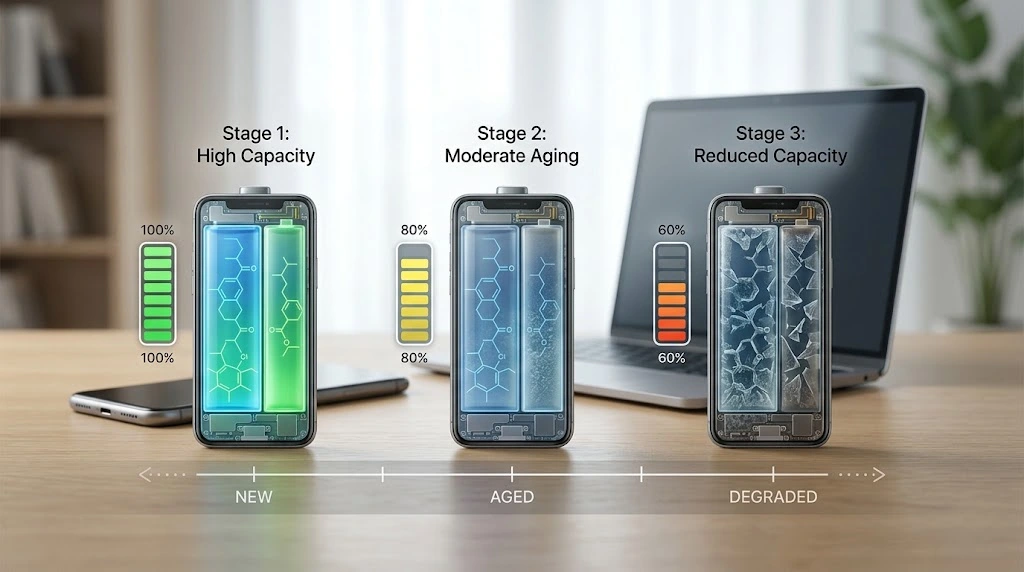
Is 80% Battery Health Bad?
An 80% reading generally indicates that the battery has experienced meaningful capacity loss.
But that does not automatically mean the device needs a replacement today.
Consider two people using the same phone. One may spend most of the day near a charger, while the other may travel for hours without access to power. The same battery health result can feel very different to each person.
A manufacturer may also have specific service recommendations. Google, for example, recommends battery replacement for supported Pixel models when remaining capacity falls below 80% or when the relevant rated cycle count is reached.
The better question is:
Has the battery’s reduced capacity become a practical problem?
If the answer is yes, battery replacement may be worth investigating.
Battery Health vs Battery Life
These terms sound similar, but they describe different things.
Battery health refers to the condition and remaining capacity of the battery.
Battery life refers to how long the device lasts before it needs another charge.
A phone can have reasonably good battery health and still have poor battery life because of heavy usage.
Common causes include:
- High screen brightness
- GPS or location services
- Video streaming
- Gaming
- Background apps
- Weak cellular signal
- Mobile data use
- Bluetooth or other connected devices
- Recent software activity
- High-performance workloads
That is why a battery health check should not be the only thing you look at when a device suddenly starts draining faster.
If the health result looks normal, check which apps and features are consuming power before assuming that the physical battery has failed.
What Causes Battery Health to Decline?
Battery degradation is a normal part of using rechargeable lithium-ion technology.
The rate of decline is influenced by several factors.
Heat
Heat is one of the biggest concerns.
Using or charging a device at high temperatures can accelerate chemical aging and permanently reduce battery capacity. Microsoft specifically recommends avoiding high temperatures when using or charging lithium-ion batteries.
This is one reason a phone that regularly gets very hot during gaming or charging may age differently from a lightly used device.
Charge Cycles
Every battery has a finite number of useful charge cycles.
That does not mean every time you plug in your phone you are significantly damaging it. A cycle is based on cumulative energy usage, including partial discharges.
Over time, however, repeated use contributes to normal capacity loss.
Battery Age
Batteries age with time as well as use.
Even if a device has not been heavily used, its battery can gradually lose some of its original capacity.
Charging Conditions
Long periods at very high charge levels, particularly in warm conditions, can contribute to faster aging.
Modern devices increasingly use charging-management features to reduce this stress. Microsoft, for example, describes Smart charging as a way to help compatible Windows devices avoid remaining at 100% for extended periods.
Heavy Workloads
Gaming, video editing, demanding applications, and other intensive tasks can produce additional heat and power consumption.
The workload itself is not necessarily a problem. The combination of high workload and high temperature is more relevant when thinking about long-term battery aging.
Signs That Battery Degradation Is Becoming a Problem
A battery health percentage can be useful, but your day-to-day experience often tells you just as much.
Shorter Runtime
If your normal routine has not changed but the device suddenly needs charging much more often, reduced battery capacity may be contributing to the problem.
Unexpected Shutdowns
An aging battery may have more difficulty delivering power during demanding situations.
Unexpected shutdowns can be related to battery condition, although software or other hardware problems can produce similar symptoms.
Charging Problems
Slow or inconsistent charging deserves investigation.
The battery may be involved, but do not overlook the charger, cable, charging port, temperature, or software.
Performance Changes
Some devices can change their power or performance behavior as a battery ages.
Apple, for example, explains that battery condition can affect peak performance capability on supported iPhones.
That does not mean every slower device has a bad battery. It is simply another reason to consider battery condition alongside other possible causes.
Physical Swelling
Swelling is different from ordinary battery aging.
If the battery expands and pushes against the device enclosure, stop treating it as a normal battery-life issue.
Do not press, puncture, bend, or attempt to dismantle a swollen lithium-ion battery. Microsoft warns that an expanded battery can present a safety risk and recommends stopping use.
Battery Health Check Before Buying a Used Phone or Laptop
A battery health check can be particularly useful when buying a second-hand device.
However, don’t make the purchase decision based on one percentage.
Look at several things together:
Remaining Capacity
A lower capacity means the battery has less energy available than when new.
That may be acceptable if the price reflects the device’s condition, but it is worth knowing before buying.
Cycle Count
If the device reports cycle information, use it as additional context.
A cycle count is not a simple “good” or “bad” score. It becomes more meaningful when considered alongside battery capacity and the device’s age.
Actual Runtime
Ask how long the device normally lasts under everyday use.
A battery can look reasonable on paper while still providing disappointing runtime because of other problems.
Charging Behavior
Test the charging process if possible.
Look for interruptions, unusual heat, extremely slow charging, or a percentage that behaves unexpectedly.
Physical Condition
Inspect the device for:
- Bulging
- Screen or enclosure separation
- Unusual heat
- Damage around the charging area
- Other signs of physical battery problems
For a used device, battery condition is only one part of the evaluation, but it can make a meaningful difference to the overall value.
Can a Battery Health Check Find Every Battery Problem?
No.
A battery health result is an important clue, not a complete hardware diagnosis.
Poor battery performance can also come from:
- A damaged charging cable
- A faulty charger
- A worn charging port
- High background activity
- Poor cellular reception
- High screen brightness
- Heavy applications
- Software problems
- Extreme temperatures
- Other hardware faults
For example, if your battery health looks normal but your phone suddenly drains twice as quickly, checking battery usage may reveal that a particular application or feature is consuming much more power than usual.
The same principle applies to laptops. A capacity reading can tell you about the battery, but it does not explain every reason a laptop may have poor runtime.
Do You Need a Third-Party Battery Health App?
Usually, the built-in information provided by the device should be your starting point.
Manufacturer and operating-system tools are designed to work with the hardware and can provide information that a third-party application may not be able to access directly.
Third-party apps can sometimes offer additional estimates, but their results may vary depending on the device and what the operating system exposes.
If you are deciding whether a battery needs professional service, manufacturer diagnostics or a qualified technician is a better basis for that decision than an unfamiliar app alone.
When Should You Replace a Battery?
There is no single percentage that works as a replacement rule for every phone and laptop.
Replacement becomes more reasonable when several signs point in the same direction.
Consider professional battery service when:
- Runtime has become impractical.
- Capacity has fallen significantly.
- The device reports a degraded or reduced condition.
- Unexpected shutdowns are becoming frequent.
- Charging problems have been confirmed as battery-related.
- The battery has reached a relevant manufacturer cycle expectation.
- A qualified technician recommends replacement.
- The battery is swollen or physically damaged.
The last point is especially important. A swollen battery should be treated as a safety issue rather than something to monitor until it becomes inconvenient.
For normal aging, however, the decision is more personal. If the device still meets your needs and the battery lasts long enough for your routine, a lower health percentage does not automatically make replacement urgent.
Can Battery Health Be Improved?
Once a lithium-ion battery has chemically aged, software settings cannot restore its lost physical capacity.
You can, however, reduce unnecessary stress on a battery and potentially slow further degradation.
Useful habits include:
- Keeping the device away from excessive heat
- Using charging optimization features when available
- Avoiding unnecessary deep discharges
- Using appropriate charging equipment
- Monitoring unusually heavy workloads
- Avoiding leaving a device at full charge in very hot conditions for long periods
Microsoft recommends avoiding frequent deep discharges and excessive heat, while compatible devices may offer Smart charging or similar battery-management features.
Google also provides charging optimization options on supported Pixel devices, including an 80% limit intended to prioritize long-term battery health.
These features help manage future wear. They do not turn an old battery back into a new one.
What If Battery Health Looks Normal but Runtime Is Poor?
This is a common situation.
Before replacing the battery, check what is actually using power.
Look at:
- Screen brightness
- Background apps
- Location services
- Mobile data
- Wi-Fi and Bluetooth
- Video and gaming activity
- Battery-heavy applications
- Recent software or system activity
- Signal strength
A healthy battery can still drain quickly if the device is doing more work than usual.
For example, someone who normally browses websites for an hour a day may suddenly see much shorter runtime after spending several hours gaming or recording video. The battery may be fine; the workload has simply changed.
This is why battery health and battery usage should be considered together.
Frequently Asked Questions
What is a battery health check?
A battery health check gives you information about the condition and remaining capacity of a rechargeable battery. Depending on the device, it may include maximum capacity, cycle count, or a health status.
What does battery health percentage mean?
It generally represents estimated remaining battery capacity compared with when the battery was new. A lower percentage indicates that the battery can hold less energy than it originally could.
Is 80% battery health still good?
It indicates noticeable aging, but it does not automatically mean replacement is necessary. Actual runtime, device age, symptoms, cycle count, and manufacturer guidance should also be considered.
Does battery health affect battery life?
Yes, because lower capacity can reduce the amount of time a device can operate between charges. However, battery life is also affected by apps, settings, connectivity, brightness, workload, and temperature.
What causes battery health to decrease?
Normal chemical aging, charge cycles, heat, battery age, charging conditions, and usage patterns can all contribute to capacity loss.
How often should I check battery health?
There is no need to check it every day. It becomes more useful when runtime noticeably changes, when buying a used device, or when you are considering battery service.
Can battery health return to 100%?
A software setting cannot normally restore capacity that has been lost through chemical aging. A replacement battery is required to restore the device’s available capacity.
Should I replace a battery below 80%?
Not automatically. Some manufacturers use 80% as an important reference point, but replacement should be based on the specific device, its condition, your usage, and manufacturer guidance.
Can a battery health check fix battery drain?
No. It can help identify whether battery degradation may be contributing to poor runtime, but it does not repair the battery or solve software-related drain.
Is battery swelling the same as normal battery degradation?
No. Normal degradation is a gradual loss of capacity. Swelling is a physical battery problem that should be treated as a safety concern.
Final Thoughts
A battery health check is most valuable when you look beyond the number on the screen.
A percentage can show that a battery has lost capacity, but it cannot tell you everything about how the device will perform in everyday use. Runtime, cycle count, charging behavior, temperature, unexpected shutdowns, and physical condition all add useful context.
If the health result looks normal but battery life suddenly becomes poor, investigate power usage before assuming that the battery needs replacement.
If the battery is significantly degraded, repeatedly causing problems, or showing physical damage, professional service may be the better option.
The real purpose of checking battery health is simple: understand what has changed, identify whether the battery is actually responsible, and make a sensible decision about what to do next.